The short answer
To stop Shopify discounts from selling below cost, you need a floor, because Shopify's native discounts don't have one. You can catch losses after the fact with Shopify's profit reports, add a checker or checkout-blocking app on top of native discounts, or use a discount engine that builds the floor into the price. Discount Prime is the third kind: its Dropshipping, Wholesale, and Bundle campaigns can enforce a cost floor plus a minimum profit, and its flat and bulk sales can use a fixed price floor, so the price is clamped and the order still goes through.
Discount Prime does not block checkout, and not every campaign type has a cost floor. If you keep Shopify's native discounts and only want a safety net, a checker app is enough. The table shows where each option acts.
App | Reviews | Price | How it protects margin | When it acts | Keep in mind |
|---|---|---|---|---|---|
Discount Prime | 5.0 · 20 | Starter free; floors from Premium $19.90/mo; Wholesale on Prime $49.90/mo | Calculates the discount with a floor of cost plus a minimum profit (Dropshipping, Wholesale, Bundle) or a fixed price floor (flat, bulk) | In the price itself | No cost floor on tiered quantity, Buy X Get Y, free gift, cross-sell, upsell or free shipping. Doesn't check Shopify's own codes |
Shopify native | Built in | $0 | No floor. Profit reports show gross margin by product, variant and order | After the order | Only items with a Cost per item at the time of sale are counted |
Floorline: Margin Protection (new, Oct 2026) | No reviews | Free; about $12 and $29/mo | Checks codes, automatic discounts and stacks against a per-product floor. Pro can block checkout and deactivate discounts | When the discount is checked, and at checkout on Pro | Doesn't create discounts. Built for native ones |
Margin Proof (new, Jul 2026) | No reviews | About $10 to $50/mo by variants with cost | Checkout validation blocks orders below a minimum net margin. The customer removes the code to continue | At checkout | The block happens at the moment of highest intent. Products without cost data never block |
Profit Guard (new, May 2026) | 5.0 · 1 | Free (view only); about $20 and $30/mo plus per-order fees | Checks each discount against margin rules when it is created or updated. Disables it, reduces it or notifies you | When the discount is created | The listing doesn't say it checks stacks at checkout |
PMG: Promotion Margin Guard (new, Oct 2026) | No reviews | About $10/mo | Tests a percentage discount against cost, then creates an automatic discount only for variants above your threshold | When the discount is created | Percentage discounts only. Variants with missing cost are left out |
Ratings, reviews, and prices from each app's Shopify App Store listing, as of November 2026. Rival prices were shown in CAD from our location and are converted to USD at the listing's rate. Disclosure: Discount Prime is our app.
We did not install the rival apps. Their rows come from their listing text only. Shopify's report details come from its profit reports help page.
Which one fits:
You keep Shopify's native discounts and want a safety net that flags risky ones: Floorline: Margin Protection or Profit Guard
You hand out many codes and would rather stop the order than lose money on it: Margin Proof, or Floorline's Pro plan
You want one percentage sale that skips low-margin variants: PMG
You want the floor in the price itself, plus wholesale, bundles and profit per campaign in one app: Discount Prime
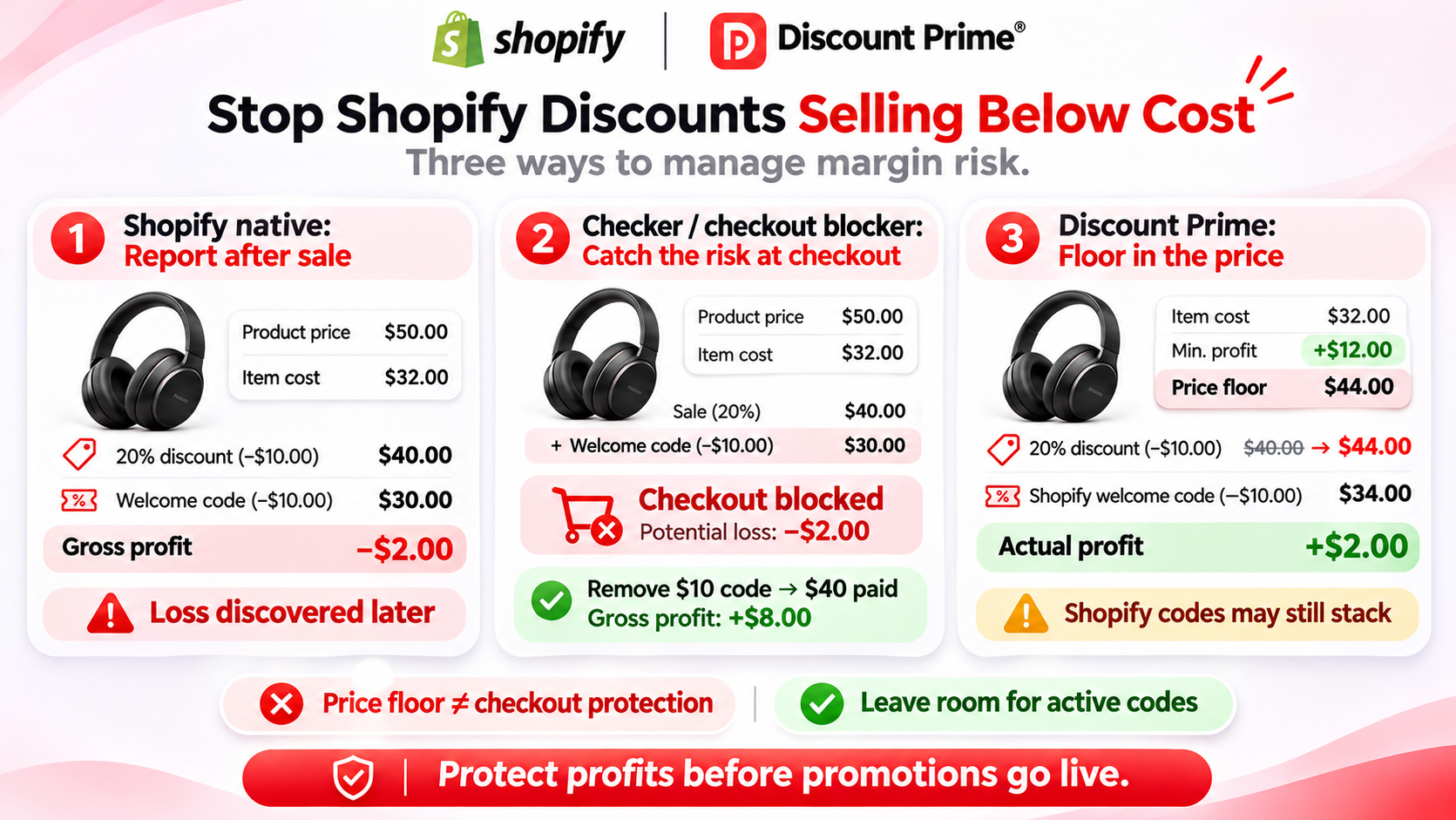
Three ways to protect margin
Margin here means gross margin: (price minus Cost per item) divided by price.
Native Shopify, plus reports after the fact. Discounts run as set. Shopify's Profit margin reports (Analytics > Reports, category Profit Margin) show gross profit by product, variant, and order. You learn about a loss after it happened.
A checker or blocker on top of native discounts. The app reads your discounts and costs. It warns you when a discount or stack can go under your floor, edits or disables the discount, or blocks the checkout.
A discount engine with the floor in the price. The app calculates the discount itself, and the floor is part of the calculation. A discount that would go under the floor is reduced to the floor.
One stacked order, three outcomes
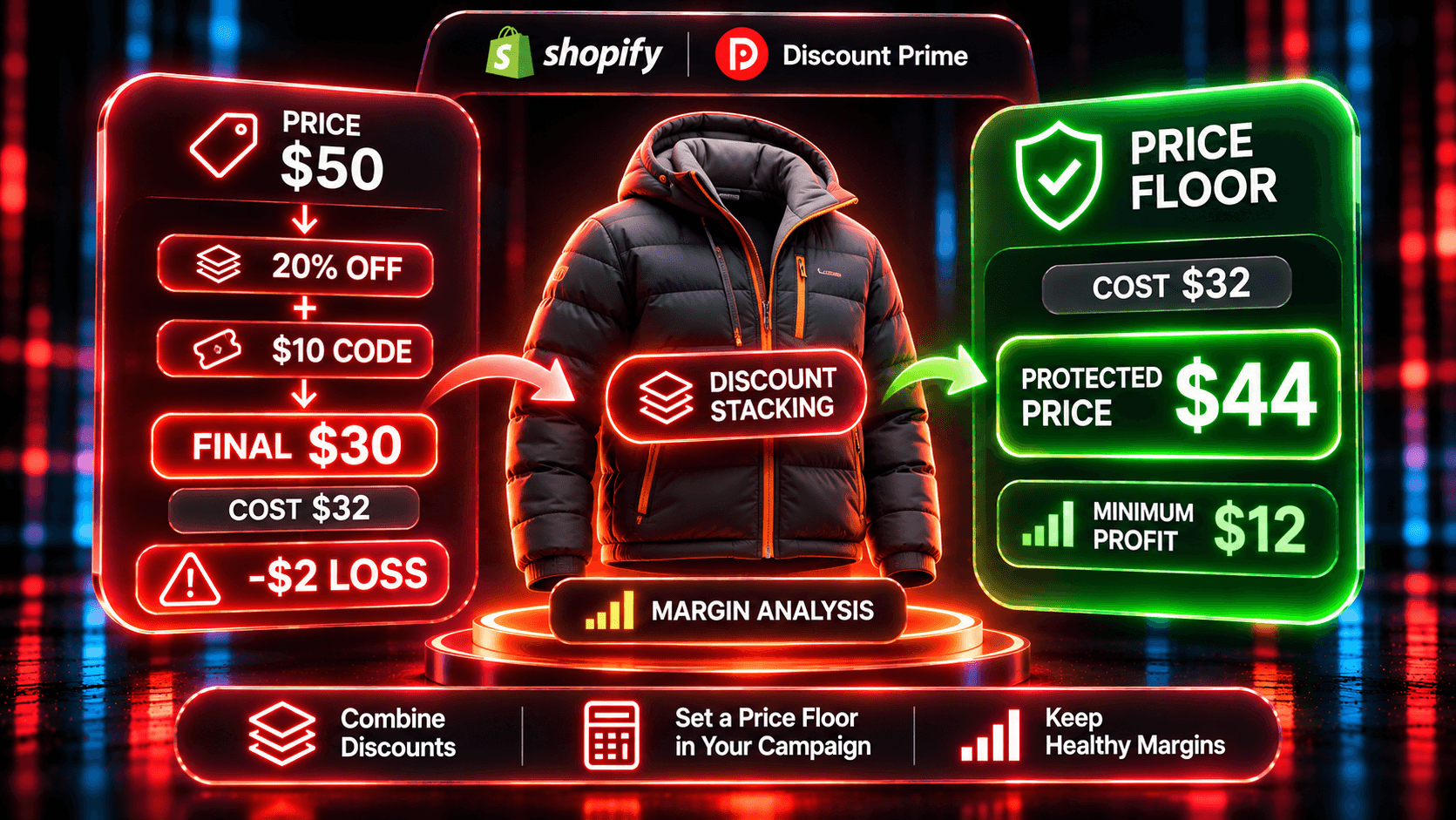
A product sells for $50 and costs $32. Gross margin is 36%. You run a 20% automatic sale, and a $10 welcome code is still active and combines with it.
1. Native Shopify. The sale takes the price to $40.00. The code takes $10 off the order, so the customer pays $30.00. Gross profit is -$2.00. The order ships, and the loss shows up in the Profit Margin by Order report.
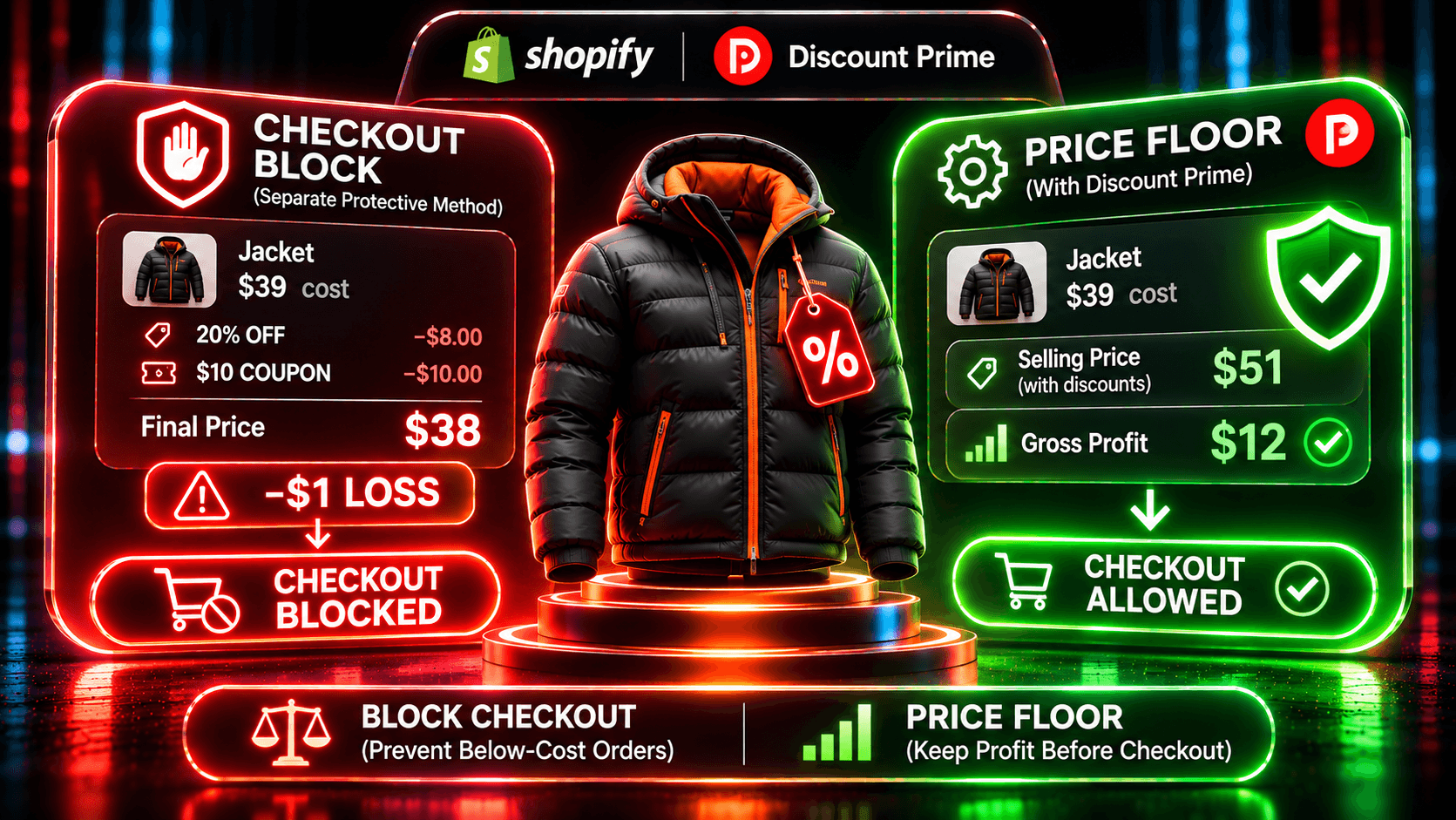
2. Checker or blocker. A checker, such as Floorline, flags that the sale plus the code can take this product below its floor, so you can change it before customers find it. A blocker such as Margin Proof stops the order at checkout. If the customer removes the code, they pay $40.00, and you keep $8.00 of gross profit. If they leave, you keep nothing.
3. Floor in the price. In Discount Prime, you take the sale from the margin instead, with a minimum profit of $12, so the floor is $44.00. A 50% off-margin request would set $41.00, so the floor holds, and the price is $44.00 (12% off). The $10 code still applies, and the customer pays $34.00. Gross profit is $2.00, and the order goes through.
Two lessons sit in that third case. First, a price floor protects the price, not the code: a Shopify code still comes off at checkout. Leave room for any code you keep active, or stop it from combining. Second, the shopper sees a smaller cut. That is the trade you make for never reaching checkout below cost.
Try these numbers in the Discount Profit Calculator or the Dropshipping Pricing Simulator.
Where Discount Prime has a floor, and where it doesn't
Campaign type | Floor | Plan |
|---|---|---|
Dropshipping Pricing | Cost plus a minimum profit, fixed or a percent of cost. The discount comes from the margin | Premium and up |
Wholesale / B2B Pricing | Margin-based tiers with a floor of cost plus a minimum profit, checked at checkout per variant. If the floor is at or above the selling price, that variant gets no wholesale discount | Prime and up |
Product Bundle | Profit protection with a minimum margin. "Reduce the discount for that set" trims the reward so no item goes under it | Premium and up |
Flat discount, Bulk Price Update | No cost-based floor. An optional fixed price floor the product won't go below | Price floor from Premium |
Tiered quantity, Buy X Get Y, Free Gift, Cross-sell, Upsell, Free shipping | No cost floor. Protected by design: conflict detection for product discounts, Best deal wins vs Stack, the free shipping cap, the upsell downsell block | Per feature |
The floor holds even with Adjust Cents. With a $10.50 floor and .49 cents, the price becomes $11.49, not $10.49. If that lands above the selling price, the variant gets no discount.
For bundles, "Apply the reward anyway" applies the full reward and doesn't enforce the floor. Choose "Reduce the discount for that set" when margin matters.
The missing cost rule
A cost floor needs a cost. If a product has no Cost per item in Shopify, Discount Prime does what you choose in the campaign: skip it, or price it from the selling price. Pricing from the selling price means no cost floor for that product. With 50% off the margin, a $50 product with no cost would drop to $25.00. Choose Skip unless you have checked those products.
Shopify has the same gap. Its profit reports count only items that had a cost recorded when they sold. Export your products and filter the Cost per item column for blanks before any sale.
Why stacking is the usual cause
Few merchants set a single discount below cost. Losses come from two discounts that look fine on their own, like the sale and the code above.
In Discount Prime, conflict detection flags product-level price campaigns that target the same product, and you choose which one keeps it. Bundle, cross-sell, and upsell campaigns use Best deal wins (the larger saving, never both) or Stack. Free shipping, order campaigns, and Shopify codes follow Shopify's combination settings. A worked example with a bundle and a sitewide sale is in: Do bundle discounts stack with other discounts on Shopify?
How to set it up in Discount Prime
Install Discount Prime on Starter (free). Profit analytics show gross profit per order and campaign right away.
Fill in the cost per item for the products you plan to discount.
Choose Premium ($19.90/month, 7-day free trial) for Dropshipping Pricing with a minimum profit, a price floor on flat and bulk sales, or Product Bundles with profit protection.
Choose Prime ($49.90/month, 7-day free trial) for B2B pricing with a per-variant floor at checkout.
Set the minimum profit with room for any code you leave active, and decide skip or price-from-selling-price for products without a cost.
Resolve conflicts where two price campaigns target the same product.
Check profit per campaign after the first day.
Where to go next
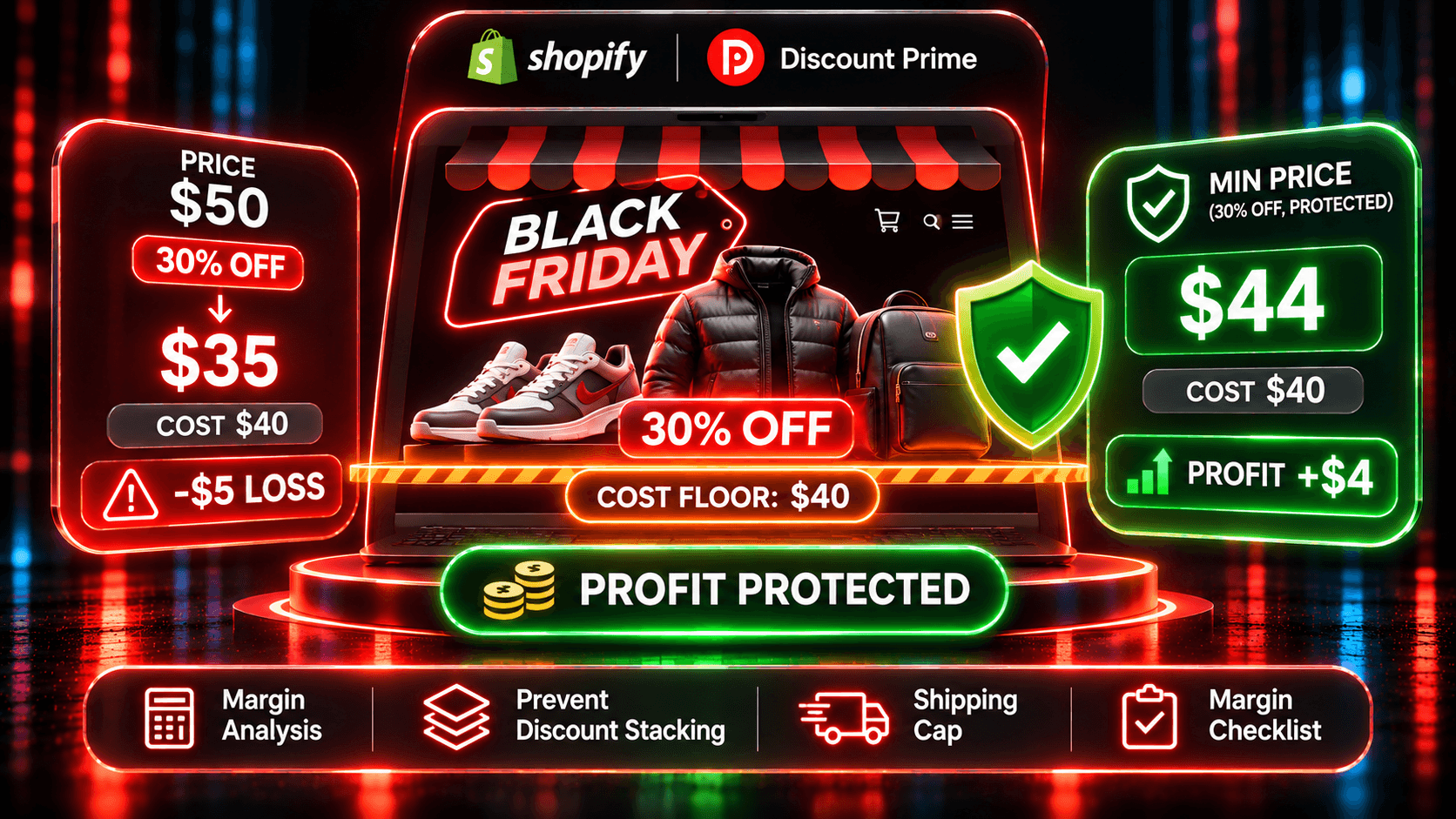
Black Friday on Shopify without selling below cost: the seven-step margin checklist for 2026
Should you block checkout when an order falls below your margin?: checkout blocks vs a price floor, with one stacked-code order
Margin-based discounts on Shopify: take the discount from your profit, not the price
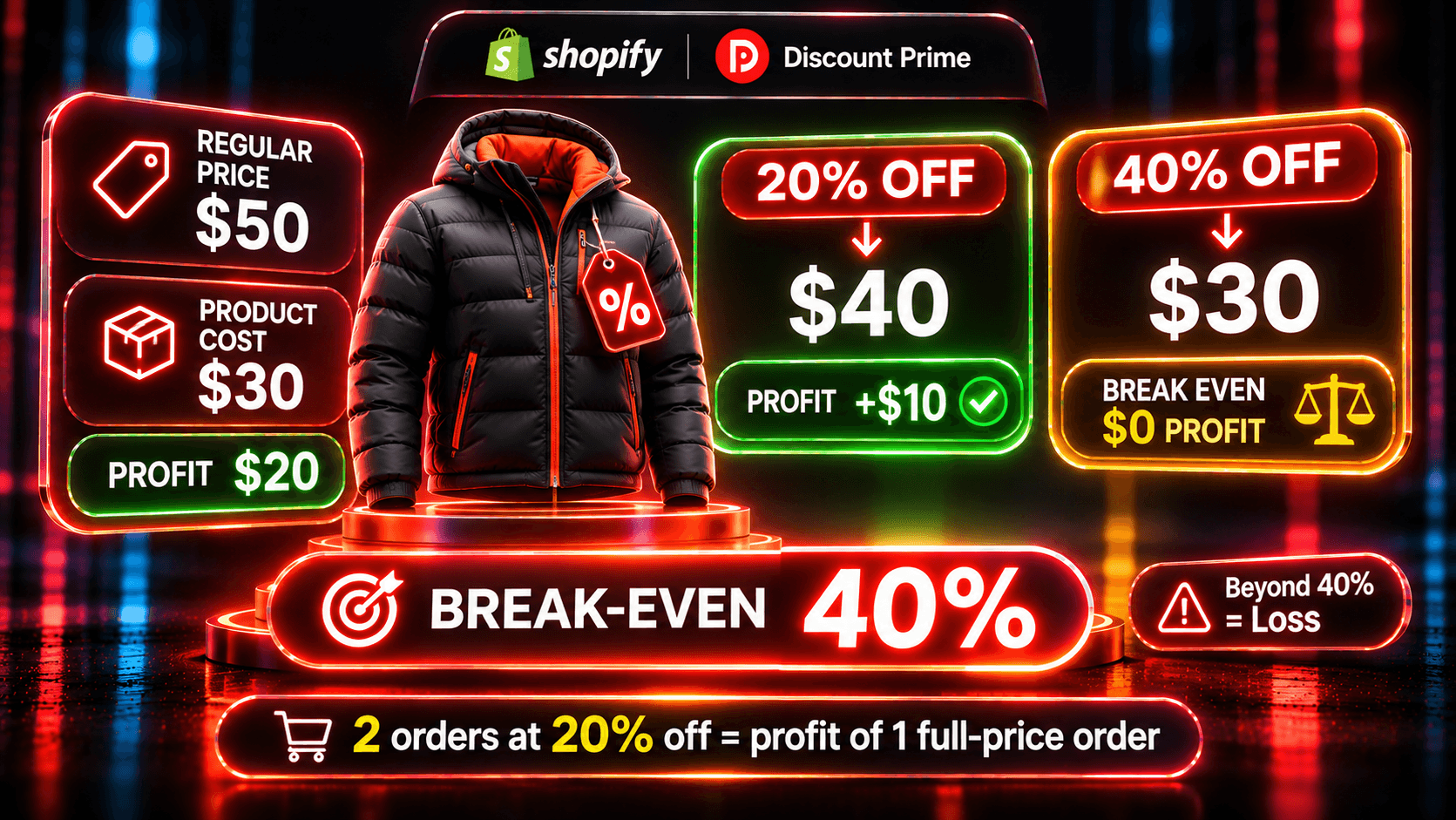
How much discount can your margin carry?: the break-even discount and the extra orders a deeper offer needs
Discount Profit Calculator: gross profit, margin and break-even discount for any offer
The profit floor: why a floor lets you run deeper campaigns
Ready to try it? Install Discount Prime from the Shopify App Store. Starter is free, and Premium includes a 7-day free trial.