The short answer
Bundle discounts stack with other discounts on Shopify when the setup allows it, and a stacked bundle can sell below cost without triggering any error. Discount Prime fits this problem because each bundle has its own setting: Best deal wins or Stack on product discounts, plus a minimum-margin floor that reads each variant's real Cost per item in Shopify.
The source of the sale matters too. Best deal wins compares Discount Prime's own discounts. A Shopify code follows Shopify's rules, and a price typed into Shopify looks like the normal price.
App | Rating · Reviews | Price | How it handles stacking | Keep in mind |
|---|---|---|---|---|
Discount Prime | 5.0 · 20 | Free Starter, but Product Bundle needs a paid plan: $19.90 to $99.90/mo | Best deal wins (default) or Stack on product discounts, set per bundle. Minimum-margin floor from Cost per item | 20 reviews. Rules do not reach Shopify codes. The floor limits the bundle's share only |
Fast Bundle | 5.0 · 3,628 | $19 to $139/mo by monthly bundle sales; free on development stores | One product discount per product, the better one wins. A setting allows or blocks combining with other discounts | No margin floor documented. Does not compound on one product |
Bundler | 4.9 · 2,773 | Free plan; $9.99 to $19.99/mo | Developer reply, Jan 2024: automatic discounts do not apply if the order qualifies for the bundle | No margin floor documented. The reply suggests a volume discount to mimic a storewide sale |
Kaching | 5.0 · 6,609 | $14.99 to $59.99/mo by added revenue; free on development stores | Not documented on the pages we reviewed | No margin floor documented. Ask support, then test a cart |
Shopify Bundles | 2.9 · 571 | Free | Supports codes and automatic discounts, under native combination rules | No margin floor documented. You change the bundle price by hand |
Ratings, reviews, and prices from each app's Shopify App Store listing, as of November 2026. Disclosure: Discount Prime is our app.
Which one fits:
You want the choice of Best deal wins or Stack, and a floor, inside the bundle: Discount Prime, from Premium.
You want a free bundle tool and accept that the bundle replaces automatic discounts: Bundler.
You want the better discount per product with no compounding to manage: Fast Bundle.
You keep your current bundle app and want a floor check across all Shopify discounts: Floorline (free plan, $12 to $29/mo, no reviews yet) or Smart Bundles & Margin Guard (from $49/mo, no reviews yet).
Shopify discount combinations in plain words
Shopify's help center puts every discount in one of three classes:
Product: applies to specific items or collections.
Order: applies to the cart subtotal.
Shipping: applies to the shipping cost.
Discounts do not combine by default. You turn it on for each discount in its Combinations section. Then these rules apply:
Any store: order plus free shipping, product plus free shipping, and product plus product on separate items.
Eligible stores: product plus order, and order plus order.
Shopify Plus: two product discounts on the same line item, using matching tags.
Never: two shipping discounts on one order.
The order of calculation is what hurts margin. Product discounts come first. Order discounts apply to the subtotal after product discounts. Shipping comes last. So a 20% order code on a bundle takes 20% of the already discounted price.
Where two discounts cannot combine, Shopify applies the best one for the cart. The longer tour of these rules is in how discount combinations work.
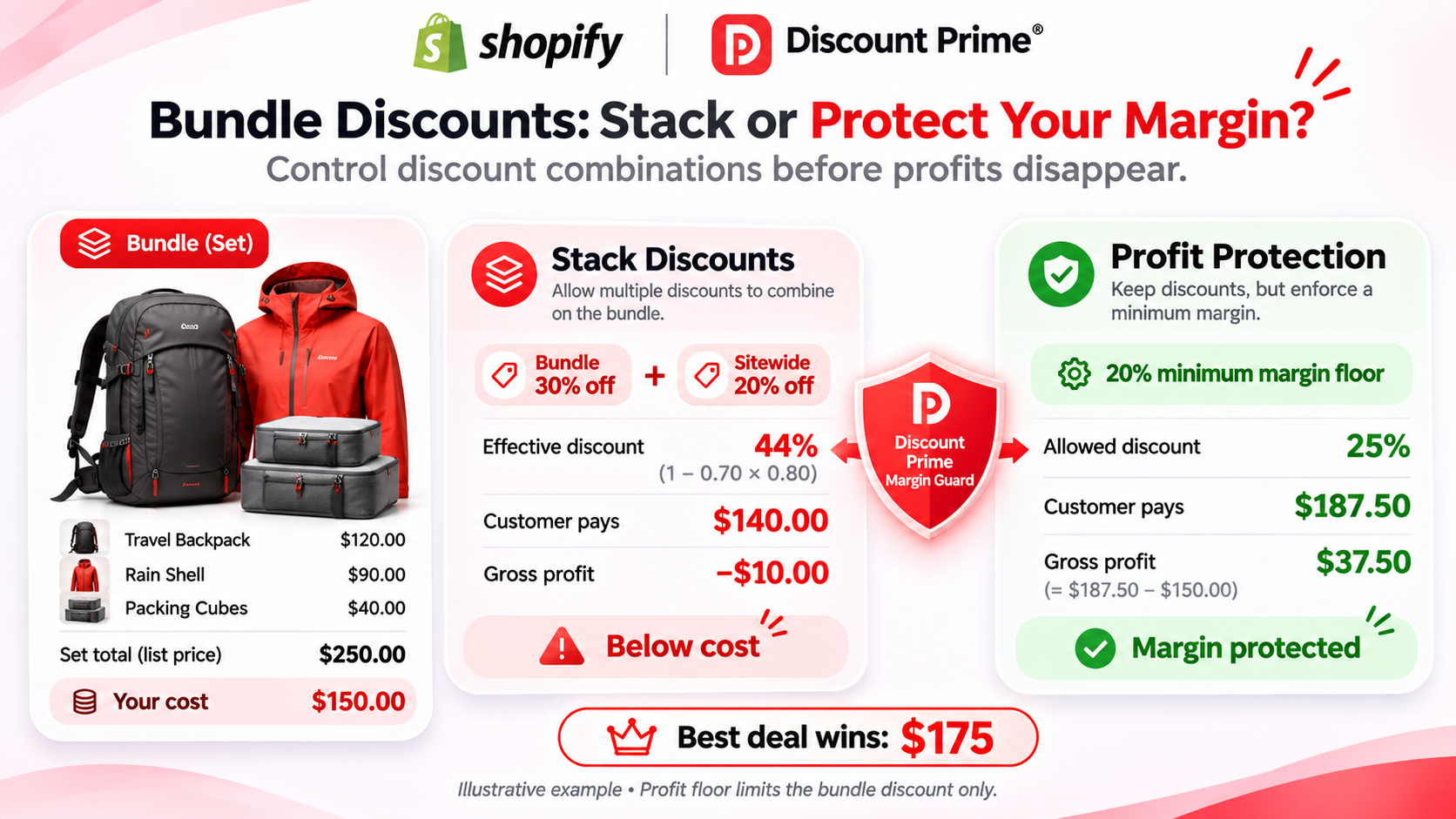
A worked example: bundle plus sitewide 20% sells below cost
Take a fictional travel set, with illustrative numbers. All three items carry a 40% gross margin, which looks safe.
Item | Price | Cost per item |
|---|---|---|
Backpack | $120 | $72 |
Rain shell | $90 | $54 |
Packing cubes | $40 | $24 |
Set at list | $250 | $150 |
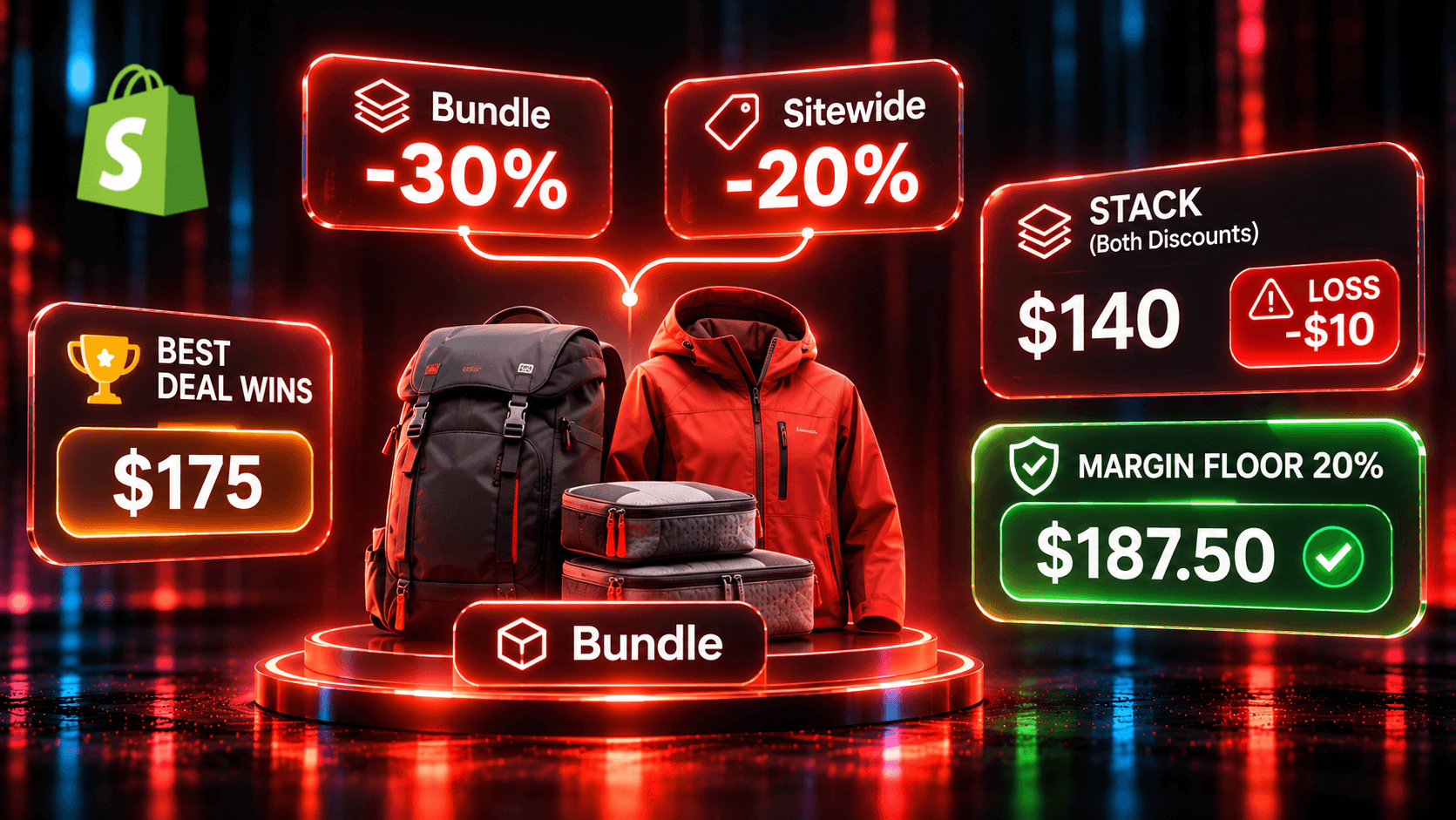
The set is 30% off when all three are in the cart. Then a sitewide 20% sale starts. Gross profit below is price minus Cost per item. Fees, shipping and returns are not counted.
Setup | Customer pays | Gross profit |
|---|---|---|
No discount | $250.00 | $100.00 |
Sitewide 20% alone | $200.00 | $50.00 |
Set 30% plus sale, Best deal wins | $175.00 | $25.00 |
Set 30% plus sale, Stack on product discounts | $140.00 | -$10.00 |
Stack, with a 20% minimum-margin floor | $187.50 | $37.50 |
The stacked math per line:
Item | List | After 20% sale | After 30% set | Result against cost |
|---|---|---|---|---|
Backpack | $120 | $96.00 | $67.20 | -$4.80 |
Rain shell | $90 | $72.00 | $50.40 | -$3.60 |
Packing cubes | $40 | $32.00 | $22.40 | -$1.60 |
Set | $250 | $200.00 | $140.00 | -$10.00 |
The discounts compound, so the total is 44% off, not 50%. That is still past the 40% margin, and the order loses $10 before fees. Nothing looks broken in the admin. For why overlaps cost more than they appear to, see why your discount stack is silently killing your margin.
Best deal wins vs Stack on product discounts
These two options sit under "Combine with other discounts" in the Product Bundle builder.
Best deal wins (the default). If an item in the set already has another Discount Prime discount, the customer gets the larger one, never both. In the example, the set share on the backpack is $36 and the sale saving is $24, so the backpack pays $84. Across the set the customer pays $175.
The comparison runs per line, not across the set. If the backpack alone were in a 40% clearance, its $48 saving beats the $36 set share. It keeps its $72 price, the other two lines take the set discount, and the set costs $163.
Stack on product discounts. The set discount comes off the price after the sale, which produces the $140 above. This is typical for wholesale. For retail, use it when you advertise the extra saving and have checked the compounded rate against cost.
For more scenarios, including a 15% and a 30% sale, read the case study On Sale and in a Set.
The profit floor, and what it does not do
The setting is "Never let this bundle push an item below a minimum margin". It reads each variant's Cost per item from Shopify. If the bundle discount would push an item below your minimum, the discount on that item is reduced.
The margin is measured on the selling price, so the floor is cost divided by (1 minus the margin). With a 20% floor:
Backpack: $72 / 0.80 = $90.00
Rain shell: $54 / 0.80 = $67.50
Packing cubes: $24 / 0.80 = $30.00
Those lines add up to $187.50, or $37.50 of gross profit, which is exactly 20% of the price. The bundle's share falls from $60.00 to $12.50.
Three limits are worth knowing:
It limits the bundle's share. It does not change what another campaign gives. If a sale alone takes an item below your floor, the floor does not raise it back.
It needs cost data. For a variant with no Cost per item, you choose to skip it (recommended) or discount it anyway.
It does not apply to a Combo product. A Combo keeps its own price and is not repriced by the floor.
In our review of 8 other bundle apps, none documents a cost-based floor inside the bundle. Not documented does not mean not supported, so ask the vendor.
Where the 20% lives decides who controls it
The same sale gives different results depending on how you create it:
A Discount Prime sale (Flat Product Discount or Bulk Price Update). Discount Prime knows the original price, so Best deal wins compares the two. The customer pays $175.
A price edited in Shopify. If you type $96 into the backpack's price, nothing tells Discount Prime it is on sale. It treats $96 as normal and takes 30% off, even on Best deal wins. Do that on all three items and the set is $140 again.
A Shopify code or automatic discount. Shopify's combination settings decide, not Best deal wins. On an eligible store, a 20% order discount that combines with product discounts takes 20% of $175, which is $35. The customer pays $140 again.
So run sales in the same app as the bundle where you can, and test everything else.
Conflict detection is a separate tool. It covers product-level price campaigns and Buy X Get Y offers that do not combine with other discounts. It does not cover free shipping, which applies to all products, or a Buy X Get Y offer set to combine. Bundles get an overlap notice in the builder instead. It lists other active campaigns on the same products, as information, never a block.
Free shipping still applies on top. In our Nov 2 test, a 20% set replaced a 15% spend discount, and free shipping over $150 still applied at checkout. Include shipping in your margin math.
How to set it up in Discount Prime
Install Discount Prime and start Premium ($19.90/mo, 7-day free trial). That plan unlocks Product Bundle with specific-product slots, one set per order.
Check your costs. Fill in Cost per item on every variant in the set. The floor and profit analytics both depend on it.
Create a Product Bundle with up to 6 slots and your reward. For slots based on a collection, tag, vendor or product type, you need Prime ($49.90/mo, 7-day free trial).
Open "Combinations & profit protection". Leave Best deal wins on for retail. Choose Stack on product discounts when the extra saving is deliberate.
Turn on "Never let this bundle push an item below a minimum margin" and enter your number. Set the choice for variants with no cost.
Run the sale as a Flat Product Discount. This campaign type is on every plan, including free Starter. Do not edit prices in Shopify for a sale.
Test a cart that triggers everything: the sale, the set, any Shopify code, and free shipping. Compare the total with your own version of the table above.
Watch the result. Profit analytics shows gross margin per campaign and order. The bundle widget shows shoppers the set price.
Where to go next
Shopify bundle apps compared, with sources for each app
Mix and match bundles by collection, tag or vendor, with margin math for a set price
Profit Analytics, for margin per campaign and order
Ready to set a floor on your first bundle? Install Discount Prime and try Premium free for 7 days.