A shipping threshold that no one can see is just a number in your settings. A progress bar turns it into a target shoppers actually chase.
Free shipping discounts are now live in Discount Prime, and they ship with a progress bar that tells each shopper exactly how much more they need to add to unlock free shipping. This is the second feature we promised at launch, and it closes one of the most common gaps we heard about in our first months: merchants wanted to reward larger carts with free shipping, automatically, without a coupon code and without hand-building a threshold banner in their theme.
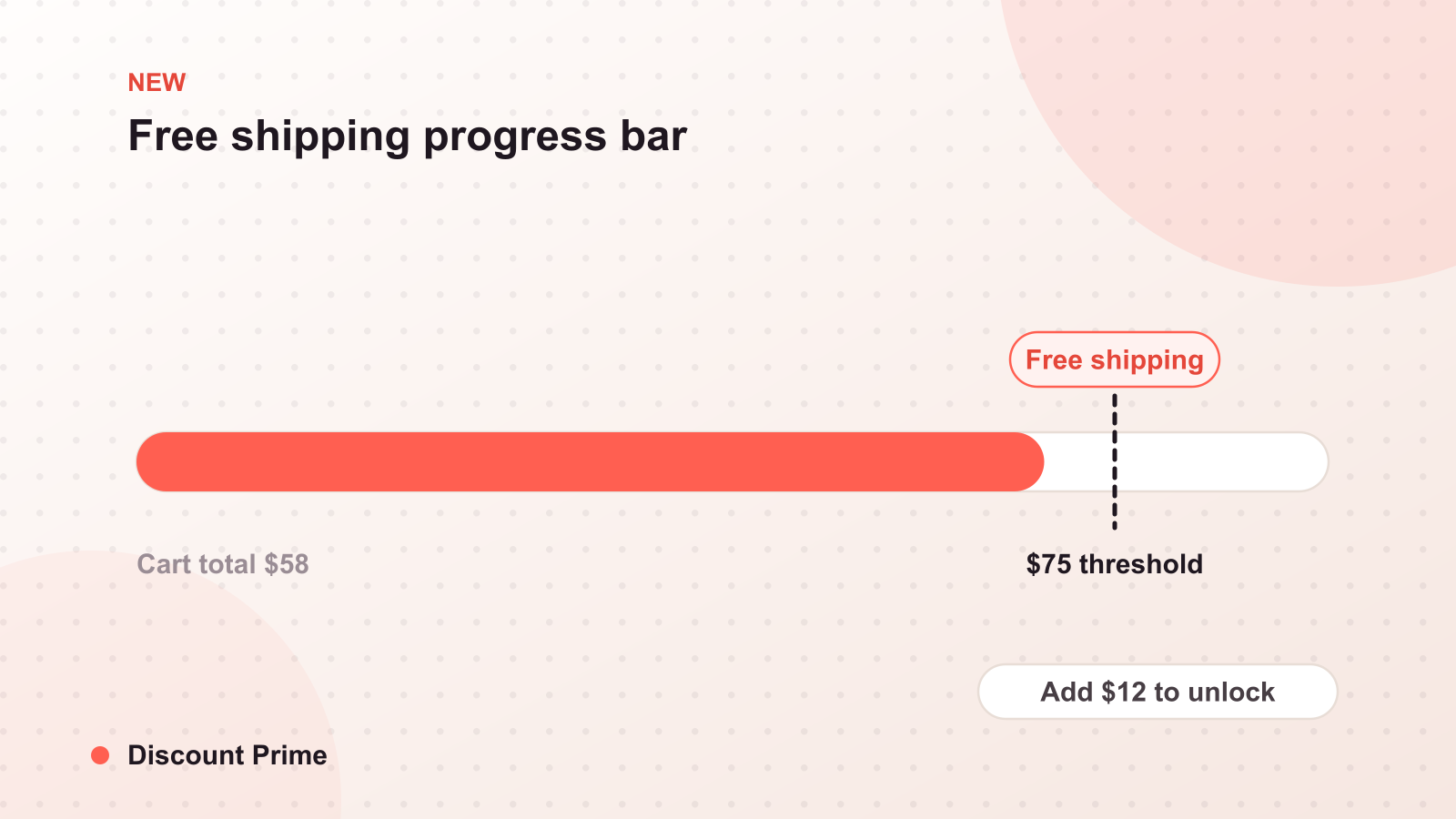
Here is the short version. You pick a cart value, say $50. Any cart that reaches it gets free shipping applied automatically through Shopify Functions. Any cart below it sees a live bar: "You are $12 away from free shipping." As items go in, the bar fills. That is the whole mechanic, and it is one of the most reliable ways to lift average order value on Shopify.
Why a progress bar beats a plain threshold
A free shipping threshold on its own is invisible. A shopper with $38 in their cart has no idea that $50 unlocks free shipping, so they never reach for the extra item. The threshold only works when the shopper can see the finish line and their distance from it.
The progress bar makes three things visible at once: the target, the current cart value, and the gap between them. That gap is the entire nudge. "Add $12 more for free shipping" is a concrete, solvable problem, and shoppers solve it surprisingly often with one more unit. You are not discounting the order that would have happened anyway; you are buying the incremental item that pushes the cart over the line.
How the discount actually applies
The free shipping discount is a Shopify automatic discount, injected natively through Functions. There is no duplicate variant, no draft order, and no code for the customer to type. When the cart crosses your threshold, shipping goes to free in the cart and at checkout. When it drops back below, the discount and the bar update instantly.
Because it runs on Shopify's own discount engine, it also respects the discount combinations system. You decide whether free shipping can stack with a product or order discount. If you want free shipping to be the reward for a big cart and nothing else, set it to not combine. If you are running a promotion where both should apply, allow it, but check your margin at the overlap first.
Three setup recipes
Recipe one: the flat threshold. The simplest and the one most stores should start with. Set a single cart value just above your average order value and leave it. If your AOV is around $42, a $50 threshold asks most shoppers for one small addition, not a second full purchase. This is the recipe we recommend for a first campaign, because it is easy to reason about and easy to measure.
Recipe two: the round-up threshold for consumables. If you sell products people buy in multiples, set the threshold at the price of a clean extra unit. Say each unit is $16 and typical carts hold two ($32). A $48 threshold is exactly three units, so the bar reads "add one more to ship free." Here free shipping and a volume discount reinforce each other: the shopper adds the third unit, hits your quantity tier, and clears the shipping bar in one move. Pair this with volume discounts and the two offers do the same job from two directions.
Recipe three: the segment threshold. Not every customer needs the same target. A returning customer with a larger typical basket can carry a higher threshold than a first-time visitor. You can run different free shipping thresholds for different situations and let the bar meet each shopper where their spending already is. Start with one flat threshold, prove it works, then layer segmentation once you have a baseline to compare against.
A worked example
Say your average order value is $40 and shipping costs you $6 to fulfill on a typical order. You set the threshold at $50.
- A shopper arrives with $40 in the cart. The bar reads "add $10 for free shipping."
- They add a $14 item to clear it. Cart is now $54.
- You absorb $6 of shipping. You gained $14 of revenue on an item that, at your margin, more than covers the $6 you gave up.
The math only works because the threshold sits above the cart that already existed. If you had set free shipping at $35, that same shopper would have gotten free shipping on their original $40 order, and you would have paid $6 for a behavior change that never happened. Threshold placement is the whole game, and we go deep on it in the math behind free shipping.
One thing to decide before you turn it on
Decide how free shipping interacts with your other discounts. If you already run automatic discounts, a new shipping discount that combines with them changes your effective margin on every qualifying cart. We wrote a full explainer on how the combination rules resolve in discount stacking on Shopify. Read it before you allow free shipping to stack, so the overlap is a choice and not a surprise.
Setting this up in Discount Prime
Free shipping discounts are available now on the free shipping feature page, and setup for a flat threshold takes a couple of minutes: pick a cart value, choose whether it combines, and the progress bar handles the rest on your storefront. If you already run volume pricing in Discount Prime, the two features share the same dashboard, so you can point both at the same products and let them work together. Install the app from the Shopify App Store to try it on your own store.