Two Shopify features get used as if they were the same thing, and the confusion quietly costs merchants the exact sale they were trying to win.
Quantity breaks and volume discounts sound interchangeable, and in casual conversation people treat the terms as synonyms. They are closely related, but they solve two different problems. Getting the distinction right is the difference between a customer who sees a reason to buy more and a customer who only discovers your deal after they have already decided how many to add.
Here is the short version. A volume discount is the pricing rule: buy more, pay less per unit, applied automatically in the cart. A quantity break is the display: the tier table on the product page that shows the customer what each quantity costs before they commit. One is the mechanic. The other is how the mechanic gets communicated. Most stores need both, and the strongest setups run them together.
What is a volume discount
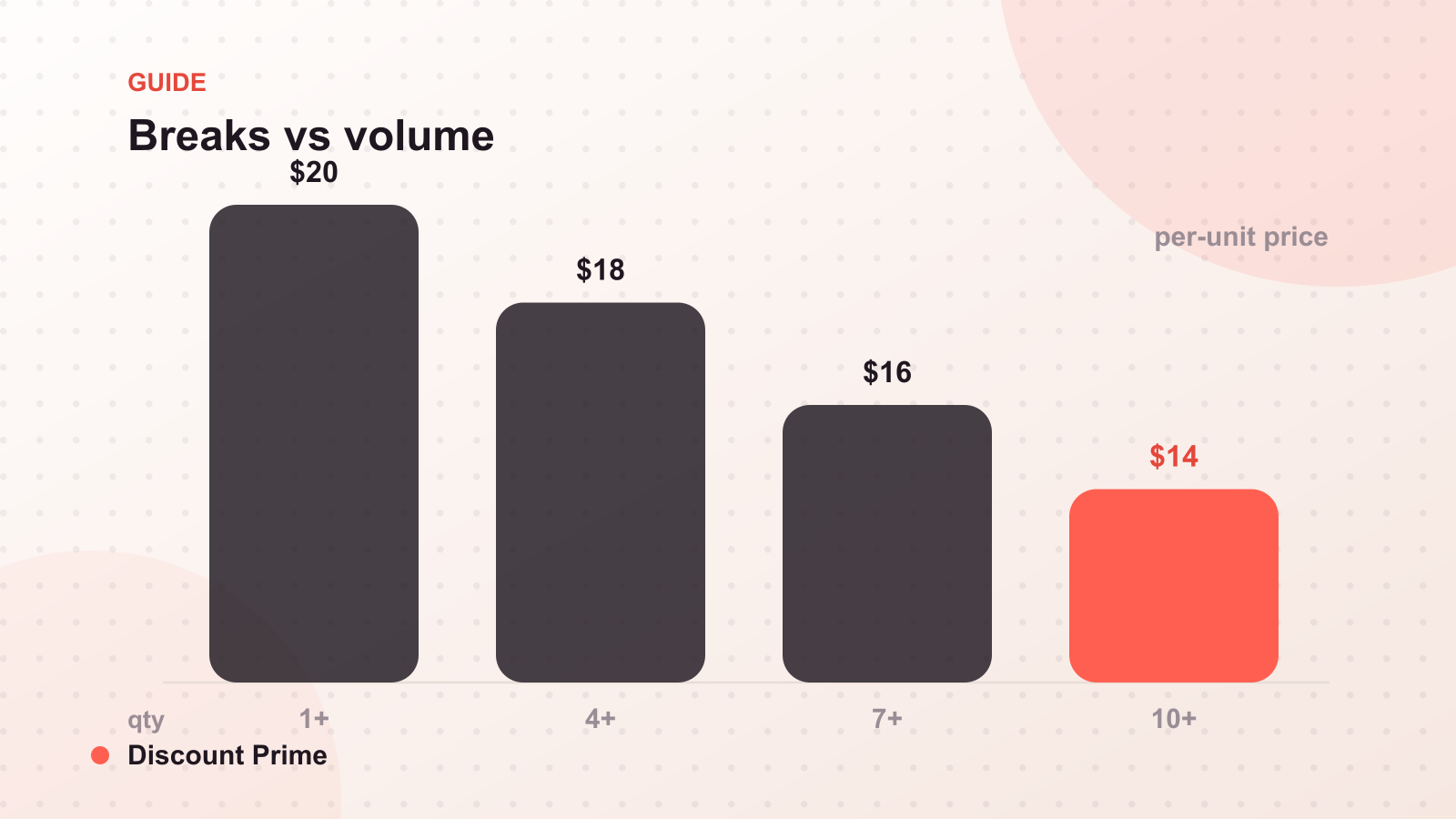
A volume discount is an automatic pricing rule that lowers the per-unit price as order quantity rises. Buy 1 at $20, buy 3 at $18 each, buy 6 at $16 each. It applies inside the cart through Shopify's discount engine, rewards larger orders instead of subsidizing existing demand, and requires no code for the customer to enter.
Because it is a rule, a volume discount does its job whether or not the customer ever sees it advertised. That is also its weakness on its own: a rule the customer cannot see rarely changes the quantity they choose.
What is a quantity break
A quantity break is the on-page presentation of tiered pricing, usually a small table or set of options near the quantity selector, showing each quantity threshold and its price. It informs the buying decision at the moment the customer chooses how many to add, rather than revealing the savings at checkout after the choice is already made.
A quantity break is persuasion, not enforcement. It shows the customer that 6 units cost $16 each instead of $20. For that promise to hold, a real pricing rule has to sit behind it. Displaying a price your store does not actually apply is worse than showing nothing.
The difference in one table
| Dimension | Volume discount | Quantity break |
|---|---|---|
| What it is | A pricing rule | An on-page display |
| Where it lives | Cart and checkout | Product page |
| Its job | Apply the savings | Communicate the savings |
| Reacts to | Quantity in the cart | The customer's attention |
| Fails when | Nobody knows it exists | It promises a price no rule applies |
| Best paired with | A quantity break | A volume discount |
The row that matters most is the last one. These are two halves of the same offer, not competing options.
When to use each
Run both by default. For any buy-more-save-more offer, pair the cart-side rule with the product-page display. The rule guarantees the price; the display gets the customer to reach the tier in the first place.
Lead with the volume discount if you can only ship one. The pricing has to be correct before you advertise it. A volume discount with no on-page display still charges the right amount; a quantity break with no rule behind it charges the wrong amount, which is a support problem waiting to happen.
Lean on the quantity break when the buying decision is quantity-first. For consumables, packs, refills, and supplies, the customer's real question is "how many should I get?" A visible tier table answers that question on the page, which is exactly where the decision is made.
A worked example
Say you sell a coffee refill at $20 per bag with a fully-loaded cost of $12, so a 40% gross margin. You set a volume discount: 3 bags at $18 each, 6 bags at $16 each.
Behind the scenes, the rule works. A customer who adds 6 bags is charged $96 instead of $120. But if the product page shows only the single-bag price, most customers add one or two bags and never trigger the tier. Attach a quantity break that displays "$20 each / $18 at 3 / $16 at 6" next to the quantity selector, and the customer can see the reason to size up before they decide.
Check the floor while you are here: at 6 bags the per-unit price is $16 against a $12 cost, so margin holds at 25%. The display sells the larger order; the rule keeps that larger order profitable. Neither half does the job alone.
Setting this up with Discount Prime
Discount Prime runs the two halves together. You define the volume discount tiers once, and the matching quantity break table displays on the product page automatically, applied through Shopify's native engine with no duplicate variants. For the full tier-design walkthrough, see our complete guide to volume discounts; and if you run more than one promotion at a time, our post on how discount combinations work covers what stacks with what. You can find the app on the Shopify App Store.