The short answer
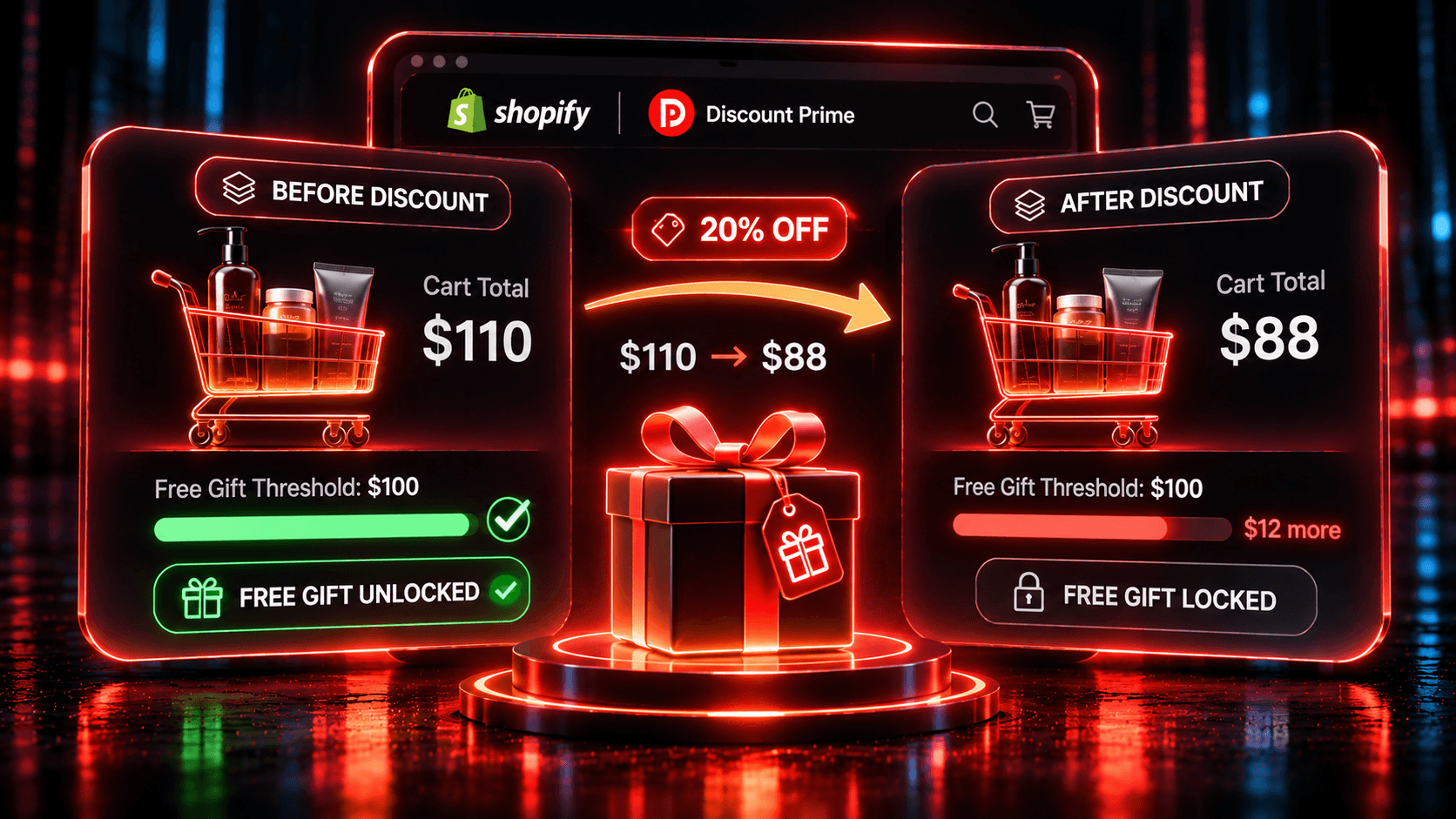
Count a free gift threshold after discounts when the gift rewards what the customer pays, because a $110 cart that a 20% sale takes to $88 should not earn a gift meant for $100 orders. Discount Prime fits that goal: its Free Gift widget reads the cart at sale prices, adds the gift when that total reaches the threshold, and removes an automatically added gift when the cart drops below it.
One limit: checkout re-checks the gift after per-item sale discounts, but not after a code, Buy X Get Y, bundle, cross-sell, upsell or order discount, so a code entered at checkout does not remove a gift that is already in the cart. If codes are your main concern, read the Qikify and BOGOS rows below.
App | Rating · Reviews | Price | How it handles the threshold | Keep in mind |
|---|---|---|---|---|
Discount Prime | 5.0 · 20 | Free Gift from Prime $49.90/mo; Ultimate $99.90/mo | Widget reads prices after sale discounts, but before bundle, cross-sell and upsell discounts. Automatic gifts are removed below the threshold, always on | A code at checkout does not remove the gift. A customer-picked gift stays in the cart at full price |
Shopify Buy X Get Y | Built in, no listing | $0 | Minimum purchase counts full price, before other discounts. Below it, the discount stops applying | The shopper adds the gift by hand. No gift ladder |
BOGOS | 5.0 · 4,599 | Free for 30 orders lifetime; $29.99 to $109.99/mo, plus $0.05 per extra order | After discounts, per a vendor forum post. Checkout block below the minimum, removal in cart drawers, post-order hold or cancel | The basis comes from a forum post. The settings docs we read do not state it |
EG (EasyGift) | 5.0 · 1,150 | Free for 1 rule; $14.99 to $49.99/mo | Before discounts, per a merchant post and EG's own doc. Removal only with "Rule works in reverse" on | With that option off, the gift stays in the cart |
Monk | 4.9 · 606 | $1 first month on a Black Friday 2026 offer; no free plan for live stores | After automatic discounts, per a forum post. Auto Remove is a setting | With Auto Remove off, the gift stays at full price. The post does not mention codes |
Qikify | 4.7 · 677 | Free for 1 live campaign; $9.99 to $49.99/mo | A before or after setting for purchase-amount offers | Removal happens only in "after discounts" mode |
Ratings, reviews, and prices from each app's Shopify App Store listing, as of November 2026. Disclosure: Discount Prime is our app.
We did not install the rival apps. Their rows reflect listings, help centers, and community threads, with sources on our free gift apps comparison. Shopify's rules come from its Buy X Get Y help page.
Which one fits:
You run sales and want gifts next to bundles, upsells, and wholesale pricing in one install: Discount Prime
You want to choose the basis yourself, and remove the gift when a discount lowers the total: Qikify
You want guards at checkout and after the order, such as hold or cancel: BOGOS
You have one simple gift and no budget: Shopify Buy X Get Y if shoppers can add the gift themselves, or EG's free plan if it must be added for them
The $110 cart, in numbers
Say you offer a gift on orders over $100. A customer has $110 of products in the cart, and a 20% sale is running.
Threshold counts before discounts | Threshold counts after discounts | |
|---|---|---|
List price total | $110 | $110 |
20% sale | -$22 | -$22 |
Customer pays | $88 | $88 |
Amount the threshold reads | $110 | $88 |
Result against $100 | Gift earned | $12 short, no gift |
Neither column is a bug. They are two different offers. One says "gift on $100 of list price". The other says "gift when you pay $100". Check which one your app runs.
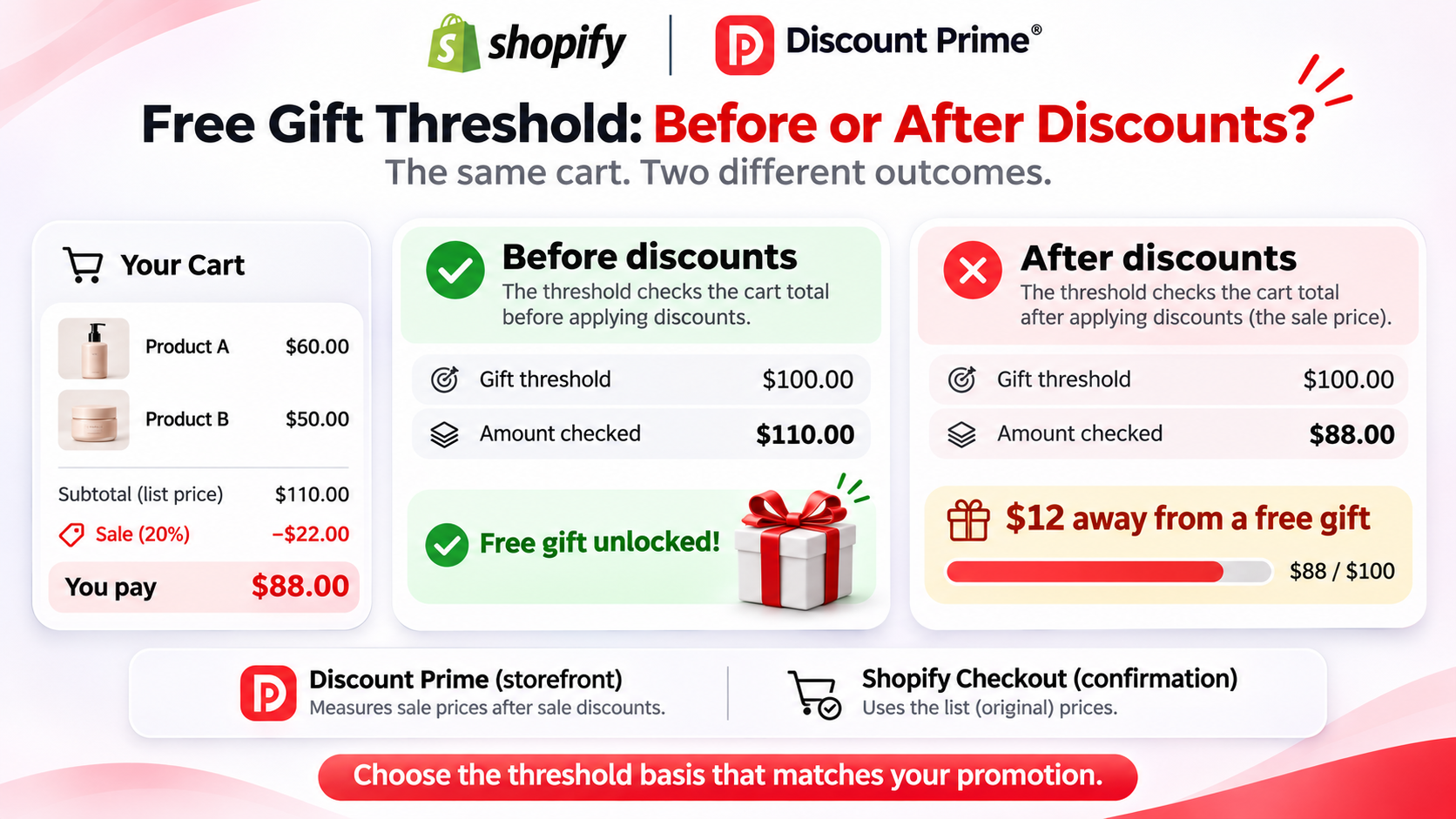
What the wrong basis costs during a sale
The gap has an exact size. At 20% off, a before-discount threshold of $100 gives the gift to every order with a list total from $100 to $124.99. Those customers pay $80 to $99.99, under the line you meant to hold.
Here is an illustrative month, not a measured result:
1,000 orders during the sale
300 of them have a list total in that $100 to $124.99 window
The gift costs you $6 landed
300 x $6 = $1,800 of gift cost on orders that paid under $100
You also lose a nudge. With an after-discount threshold, the $88 customer sees $12 to go, and one more item listed at $15 costs $12 at the sale price, reaching $100.
For where to set the number and how to cost the gift, see free gift with purchase mechanics and margin math.
When counting before discounts is the right call
After-discount is not always better.
A sale can delay the gift. If you promote "free gift over $100" and then start a 20% sale, a shopper with $110 of products no longer qualifies. To keep the offer the same during the sale, lower a threshold that reads sale prices to $80, since $100 at list is $80 at 20% off.
A disappearing gift can annoy. Qikify's help page says that in "after discounts" mode, the gift is removed and an error message appears in the cart when a discount lowers the total below the minimum. That protects margin and can surprise a shopper who just entered a code.
Your app may decide for you. EG's documentation says its cart value trigger works on pre-discount prices, and it suggests raising the trigger to offset the discount. For a 20% sale and $100 of paid spend, that means a $125 trigger.
How rivals document the basis
Documented by the vendor: Shopify counts products at full price before other discounts, and an item already reduced by a combined product discount does not count at all. Qikify documents a before or after setting.
Forum posts: A BOGOS representative says its condition uses the final cart total after discounts. A poster recommending Monk says it counts after automatic discounts.
Other records: Upcart documents that gift tiers ignore discounts. Gift Box documents a post-order check that uses the final order.
Not documented in what we reviewed: AOV.ai, CartBot, Kaching Cart, Rebuy and Essential. Not documented does not mean not supported, so ask the vendor.
How gift removal stops the add-then-remove trick
Threshold basis decides who earns the gift. Removal decides who keeps it. The abuse is simple: fill the cart, collect the gift, delete the items and check out.
Here is what happens in Discount Prime, with a $100 threshold during a 20% sale:
The customer has $130 of products at list, which is $104 at the sale price. The widget adds the gift at $0.
The customer removes a $20 item. The cart is now $110 at list and $88 at the sale price.
On that cart change, the widget sees $88 and removes the automatically added gift.
If a gift line is still in the cart at checkout, the discount function checks the threshold again. It counts prices after sales that changed the product price and after Discount Prime's per-item quantity and tiered discounts, so this $88 cart fails and the gift is charged at full price.
Both checks read the sale price in this case. The function does not subtract a code, Buy X Get Y, bundle, cross-sell, upsell or order discount, and bundle, cross-sell and upsell lines count at list price, so with those the widget is the check that binds.
Other cases from our November 2026 test on a live development store:
Gift added by hand: two totes added straight to the cart without qualifying were charged $15 each, and the widget removed them on the next cart load.
Quantity raised: setting the gift quantity to 3 left it at 1.
Customer-picked gifts behave differently: a gift the customer chose is not removed. It stays in the cart and is charged at full price, so test that case and mention it in your gift wording.
Why gift units must not count toward other campaigns
A free unit in the cart can trigger a second reward you never meant to give. Take a "buy 3, save 15%" tier on a collection, with two paid items at $50 each and a gift from the same collection. If the gift counts as the third unit, the customer gets the gift plus $15 off $100, on an order with two paid units.
In Discount Prime, gift units are set aside first. They cannot fill a bundle, cross-sell or upsell, and they do not count toward the minimums of quantity, tiered or wholesale campaigns.
One exception: free shipping and order-level spend thresholds can still count the gift's list price. If the gift lists at $20, a $75 cart may read as $95 to a $90 free shipping rule, so test a cart just under those lines.
Out-of-stock gifts are skipped. If a gift variant has no stock, the widget offers the next gift in the tier or hides the tier, and the campaign list shows a warning. A variant set to continue selling when out of stock counts as available and keeps being added.
How to set it up in Discount Prime
Free Gift starts on Prime. The free Starter plan and Premium do not include it.
Install Discount Prime and choose Prime, $49.90/month with a 7-day free trial.
Create a Free Gift campaign with the "Spend & get a gift" scenario (Prime).
Set Count spend on to Any product, or scope it to specific products, a collection, tag, vendor or product type (Prime).
Set Spend at least with sale prices in mind (Prime). The measurement is fixed behavior, not a setting.
Choose Add automatically and pick the gift with Browse (Prime).
Choose the storefront display: Progress bar, Toast notification or Silent (Prime). The Free Gift widget is one of 13 storefront widgets, and it needs an active Free Gift campaign.
Set the schedule and Save (Prime). Match the dates to your sale if the threshold is sale-specific.
Add more on Ultimate if you need it, $99.90/month with a 14-day free trial: up to 5 tiers, Customer picks with up to 6 options per tier, and segment eligibility.
Test three carts before launch: one just under the threshold during a sale, one with a code entered at checkout, and one just under any free shipping line.
Where to go next
Free Gift: every setting, including how spend is measured
Shopify free gift apps compared: field tests and sources for 11 apps and Shopify Buy X Get Y
Do bundle discounts stack with other discounts on Shopify?: the same question for bundles
Twenty-Five Dollars Away: an illustrative $75 gift scenario with the break-even math
Ready to try it? Install Discount Prime from the Shopify App Store. Prime includes a 7-day free trial.