
Shopify volume discount simulator
By the Discount Prime team. Last reviewed November 7, 2026.
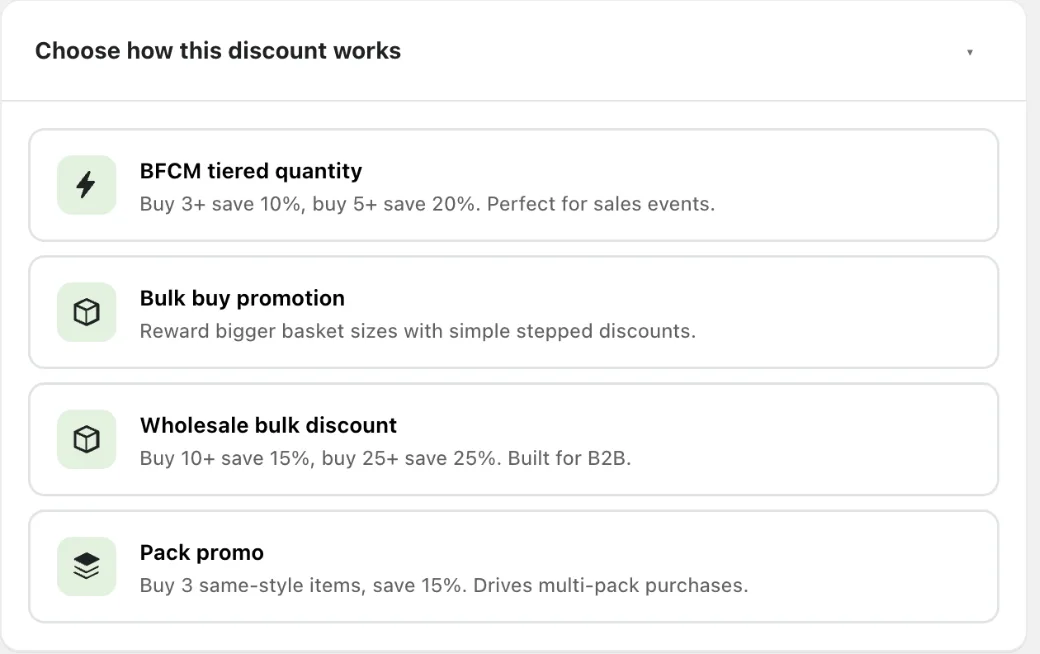
Pick one of Discount Prime's volume templates, change the tiers and build a sample cart. The simulator applies the same rules as the app's checkout discount: which tier the cart reaches, which units get the discount, the label each line shows, what the customer pays and the gross profit left after cost per item.
- Customer pays
- $78.40
- Discount
- $19.60
- Gross profit
- $38.90
- Gross margin
- 49.6%
Counted: 5 units across the campaign's products. Tier 2 (from 5 units: 20% off) applies.
| Line | At checkout | Discount | Line total |
|---|---|---|---|
| Vanilla candle2 x $22.00 | Quantity Discount ($4.40×2)20% off | -$8.80 | $35.20-$8.80 |
| Cedar candle2 x $24.00 | Quantity Discount ($4.80×2)20% off | -$9.60 | $38.40-$9.60 |
| Matches1 x $6.00 | Quantity Discount ($1.20)20% off | -$1.20 | $4.80-$1.20 |
| Cart before discount (gross profit $58.50, 59.7%) | $98.00 | ||
| Effective discount | 20% | ||
This cart keeps a gross profit after the discount.
One cart, two ways of counting
The BFCM Tiered Quantity template gives 10% off from 3 units and 20% off from 5. The cart holds 5 units: 2 vanilla candles at $22, 2 cedar candles at $24 and a $6 box of matches. Whether the tiers count all items or each product line decides everything:
| Tiers count | Tier reached | Discount | Customer pays | Gross margin |
|---|---|---|---|---|
| All items together | 20% off | $19.60 | $78.40 | 49.6% |
| Each product line | None (largest line has 2 units) | $0.00 | $98.00 | 59.7% |
Counted together, the matches help the cart reach the 5-unit tier, and 20% comes off all 5 units, matches included. At checkout each line shows its own saving, for example Quantity Discount ($4.40×2). Counted per line, no product reaches 3 units and the same customer pays full price. Use all items when you want customers to mix products, and each product line when the deal is about stocking up on one item.
How Discount Prime applies volume tiers
- All items together, or each product line
- With all items, the units or spend of every product in the campaign add up, so 2 candles and 2 more candles count as 4. With each product line, a line reaches a tier with its own quantity or spend only.
- The highest tier reached applies
- Tiers are sorted from the smallest minimum. The cart gets the last tier it reaches, and that tier's discount applies to every eligible unit, not only to the units above the minimum.
- Spend is the cart price before this discount
- Product spend tiers count the line prices in the cart. A sale that already changed the product price is part of that number; the volume discount itself is not.
- A cap goes to the cheapest units first
- An optional maximum limits how many units, or how much spend, gets the discount. With all items, the discounted units are the cheapest ones in the cart.
- Fixed amounts are split by spend
- With all items, a fixed amount off is shared across lines in proportion to each line's spend. Apply it once and it is one amount for the whole group instead of an amount per unit.
- A tiered unit price only lowers the price
- Tiered unit pricing sets a new price per unit at checkout. A line that already costs the tier price or less keeps its price.
What the simulator leaves out
- Other campaigns on the same products, such as Buy X Get Y, bundles and free gifts. Each simulator covers one campaign type.
- Customer eligibility (logged-in, segments, tags, purchase history). The simulator assumes the shopper qualifies.
- Discount codes, order-level discounts, shipping and currency conversion. Enter every amount in one currency.
- Shopify's own rounding of percentage discounts by a cent or so on some lines.
An estimate for planning. Test a campaign in your store before you launch it.
Build the same campaign in Discount Prime
Every scenario above is a template in the app. Pick it, choose the products, and the tiers show on the product page as a pricing table and in the cart as a labelled discount. Tiered quantity discounts are on the free Starter plan with one discount tier; multiple tiers start on Premium. Profit Analytics tracks the gross profit of every discounted order after launch.
Questions merchants ask
Do Discount Prime quantity tiers count all items in the cart or each product?
You choose. All items adds up every product in the campaign, so a customer can mix 2 of one product and 3 of another to reach a 5-unit tier. Each product line counts every line on its own, so the same cart reaches nothing unless one product has 5 units.
Does the tier discount apply to every unit or only the units above the minimum?
To every eligible unit. A cart of 6 at a tier of 15% off from 6 units gets 15% on all 6. A maximum on the tier is the way to limit how many units get the discount.
What is the difference between tiered quantity and tiered unit pricing?
Tiered quantity takes a percentage or an amount off at each tier. Tiered unit pricing sets the unit price itself, for example $10 each from 1 unit, $7 from 10 and $5 from 50, which is how wholesale price lists are usually written.
Does a product spend tier count prices before or after discounts?
It counts the cart line prices before the volume discount itself. If a sale already lowered the product price in Shopify, the lower price is what counts.
Is this exactly what my checkout will show?
The simulator follows the same rules as Discount Prime's checkout discount for one campaign, including the line labels. Other campaigns, customer rules and Shopify's rounding can change the final cents, so test the campaign in your store before launch.
Related guides
- Volume discounts on Shopify: the complete guide
- Quantity breaks vs volume discounts on Shopify
- Tiered pricing on Shopify: how to structure tiers
- Discount profit calculator: margin and break-even for one offer
Discount Prime is our app. The rules come from its checkout discount code and test suite.