
Shopify sale price simulator
By the Discount Prime team. Last reviewed November 7, 2026.
A flat discount and a bulk price update change the product price in Shopify itself. Pick a Discount Prime template, enter a few products and see the new price, the compare-at price your theme strikes through, and the profit per unit left after cost, using the same rules as the app.
Campaign type
- Prices changed
- 4 of 4
- Average change
- -20%
- Linen throwNow $49.99
Storefront shows $39.99$49.99-20%
New compare-at: $49.99
Profit per unit $28.99 (58%) to $18.99 (47.5%)
- Wool blanketNow $89.00, compare-at $110.00
Storefront shows $71.20$89.00-20%
New compare-at: $89.00
Profit per unit $51.00 (57.3%) to $33.20 (46.6%)
- The existing compare-at price of $110.00 is replaced by the current price.
- Cushion coverNow $19.99
Storefront shows $15.99$19.99-20%
New compare-at: $19.99
Profit per unit $13.49 (67.5%) to $9.49 (59.3%)
- Table runnerNow $12.00
Storefront shows $9.60$12.00-20%
New compare-at: $12.00
Profit per unit $5.00 (41.7%) to $2.60 (27.1%)
Every new price stays above cost.
The same 20%, two different storefronts
A wool blanket sells for $89 and costs $38. Here it is with 20% off as a flat discount and as a bulk price update:
| Campaign | New price | Compare-at | Margin |
|---|---|---|---|
| Flat discount | $71.20 | $89.00 | 46.6% |
| Bulk Price Update | $71.20 | none | 46.6% |
The price and the margin are the same: 57.3% before, 46.6% after. What the shopper sees is not. The flat discount reads as a sale, with $89.00 crossed out. The bulk price update reads as the new regular price. A price floor and Adjust Cents shape the final number on top: a $12 table runner at 30% off would be $8.40, a $10 floor lifts it to $10.00 and .99 cents make it $10.99.
How Discount Prime changes prices
- The price itself changes
- A flat discount and a bulk price update rewrite the product price in Shopify. Every shopper, every sales channel and every other discount sees the new price, so there is no discount line at checkout.
- Flat discount: the old price becomes compare-at
- By default the old price moves into the compare-at price, so most themes show it struck through. You can also discount from the compare-at price, change only the price, or lower both.
- Bulk Price Update: compare-at stays as it is
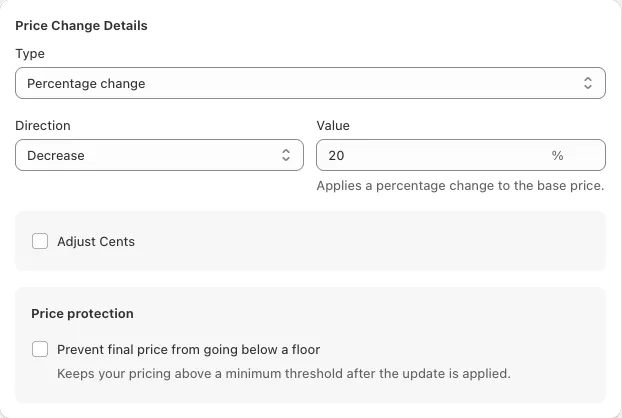
- A bulk price update changes the price by a percentage, an amount or to a set price, up or down. It never moves the old price into compare-at, and on an increase it keeps a compare-at price only while it stays above the new price.
- Floor first, then cents
- A price floor raises any price that would land under it. Adjust Cents then sets the ending, such as .99. If the cents would take the price back under the floor, the price moves up by $1 with the same ending. We are aligning the app with this behaviour.
- Products the campaign leaves alone
- A fixed amount larger than the price skips the product, and a result of $0 is not written. Discounting from compare-at skips products without one, unless you choose to use the price instead.
- Ending the campaign restores prices
- When a flat discount or bulk price update ends, Discount Prime writes back the prices and compare-at prices it stored when the campaign started.
What the simulator leaves out
- Checkout discounts that stack on the new price, such as volume tiers, bundles or codes. They all apply to the lowered price.
- Customer eligibility. A price change is public, so every shopper sees it.
- Countdown timers and sales badges, which change how the offer looks, not the price.
- Currency conversion. Enter every amount in one currency.
An estimate for planning. Preview a campaign in the app before you launch it.
Run the same change in Discount Prime
Every scenario above is a template in the app. Pick it, choose the products or collections, schedule it, and Discount Prime writes the new prices to Shopify and restores the originals when the campaign ends. Profit Analytics then shows what the sale earned per campaign.
Questions merchants ask
What is the difference between a flat discount and a bulk price update?
Both change the product price in Shopify. A flat discount is a sale: by default the old price becomes the compare-at price, so the theme shows a strikethrough, and the prices go back when the campaign ends. A bulk price update is a repricing tool: it moves prices up or down by a percentage, an amount or to a set price, and leaves the compare-at price alone.
Will my theme show the old price crossed out?
Shopify themes cross out the compare-at price when it is higher than the price. A flat discount in its default mode sets the compare-at price to the old price, so the strikethrough appears. A bulk price update does not create a compare-at price.
How does Adjust Cents work with a price floor?
The floor is applied first, then the cents replace the ending. With a $10.00 floor and .99 cents, a price that would fall to $8.40 becomes $10.99. If the cents would go under the floor, for example a $10.50 floor with .25 cents, the price moves up to $11.25.
Do other discounts apply on top of the sale price?
Yes. Because the price itself changes, volume tiers, bundles, free gifts and discount codes all calculate from the new, lower price.
Can a sale price be shown only to some customers?
No. A price change in Shopify is public. For customer-specific pricing, use a checkout discount such as tiered unit pricing or wholesale pricing with customer eligibility.
Related guides
- Bulk discounts and bulk price updates in Discount Prime
- Volume discount simulator: tiers on a sample cart
- Discount profit calculator: margin and break-even for one offer
- Profit-first promotions: how much discount your margin can carry
Discount Prime is our app. The rules come from its pricing engine and test suite.