AI has genuinely compressed the time it takes to get a Shopify store from nothing to live. What it has not changed is what makes that store work in the months after launch. The split between those two things is worth being precise about, because the second half is where most first launches quietly lose money.
The production work is what collapsed: writing first drafts, laying out pages, generating a theme, filling a catalog with descriptions, producing image variants. The decisions underneath that work did not collapse. What you sell, to whom, at what price, and at what margin are still yours, and no current tool makes them for you.
What follows is a launch sequence in that order. The fast parts first, the parts that need your judgment last. We build a discount and margin app rather than a store builder, so there is a bias worth declaring up front: we think step three is the one people skip, and skipping it is expensive.
Step 1: Store setup and theme
This used to be the slow part. Choose a theme, learn its section system, wrestle the settings into shape, then hire someone when it stops behaving. A category of tool now called the AI store builder automates the generic version of that job. You answer a short series of questions about what you sell, and it produces a store structure, a theme, and starter pages that you then edit.
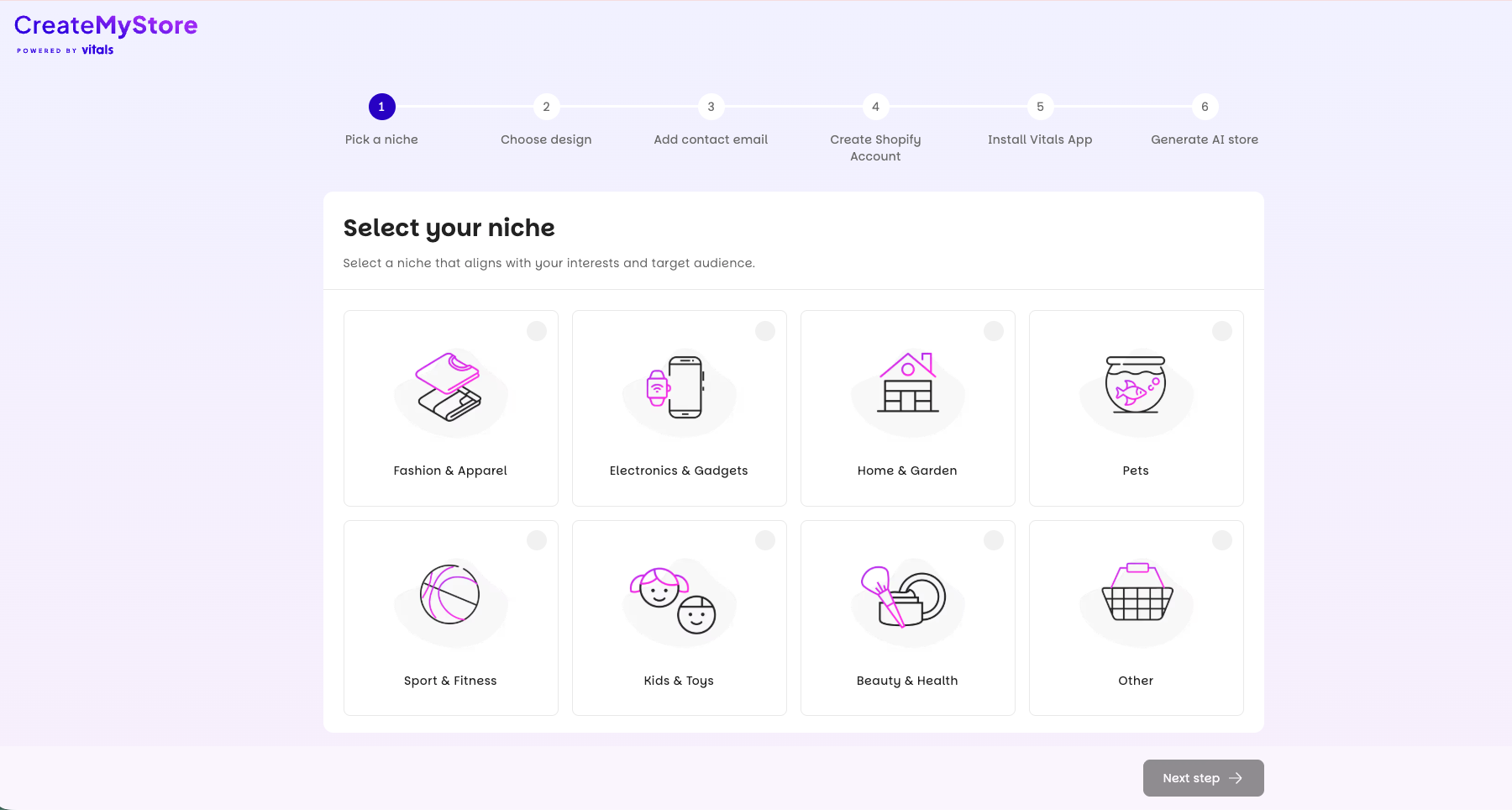
CreateMyStore, powered by Vitals, is one of these. You choose a niche and answer a few questions, and it builds the storefront around those answers: design, logo, product pages, and imagery, with the Vitals app suite installed alongside. It works on new Shopify stores only, so it is a tool for the launch itself rather than something you point at a catalog you already have.
Treat whatever any of these tools produces the way you would treat any other generated first draft. The output will be competent and generic, because a niche and a short questionnaire cannot contain what you know about your customers. The parts worth your afternoon are the ones a generator cannot guess: your actual photography, the specific objection your homepage needs to answer, and a navigation that matches how your buyers group products rather than how a template groups them.
Step 2: Product content and imagery
Descriptions are the clearest win. A model given real specifications, materials, dimensions, and use cases will write a serviceable description far faster than you will, and it will do it two hundred times without getting bored. The failure mode is equally clear. Feed it nothing but a product title and it produces fluent copy that says nothing, and a catalog of that reads exactly like what it is.
So the input matters more than the tool. Give it the spec sheet, the supplier notes, and the questions customers actually ask in your inbox. Then edit for the claims you are willing to stand behind, because a generated sentence about durability or sourcing becomes your responsibility the moment it sits on a product page.
Imagery is further along than most merchants expect for secondary assets: lifestyle backgrounds, scale references, seasonal variants of a shot you already own. It is still not a substitute for one honest photograph of the actual product. Customers returning items they felt were misrepresented is a margin problem, not a creative one.
Step 3: Set cost prices before you set a single discount
This is the step that gets skipped, and it is the one that decides whether the rest of the launch was worth doing.
Shopify has a cost per item field on every variant. It is optional, it is empty by default, and nothing in the launch flow forces you to fill it. A store can run for a year without it and everything will appear to work. Reports populate. Orders arrive. The dashboard shows revenue climbing.
What you will not have is any way to answer the only question that matters about a promotion: did it make money? Without cost data, every analytics surface you own reports revenue and units. A campaign that sold 400 units at 30 percent off looks identical to a campaign that sold 400 units at 30 percent off and lost money on every one of them. You cannot separate the two after the fact, which means you cannot decide whether to run it again.
Fill in cost per item during catalog setup, while you are already touching every product and the supplier invoice is still in front of you. Shopify records unit cost against an order at the time the order is placed, so backfilling later fixes your future reporting but does not repair the orders you already have. Once the data is there, profit analytics can report net margin per campaign and per order instead of gross revenue.
There is a longer argument for running promotions this way in profit-first promotions. The short version is that a discount is something you buy with your own margin, and you should know the price before you agree to it.
Step 4: Your first promotions
New stores tend to open with a sitewide percentage off, because it is the easiest campaign to explain and the fastest to configure. It is also the one that teaches your first cohort of customers to wait for the next sale, and it discounts your best sellers by exactly as much as your slow movers.
The more durable opening play is a quantity-based one. Volume discounts and quantity breaks tie the discount to a larger order rather than to the calendar, so the customer earns the lower price by giving you a bigger basket. Average order value moves, per-unit fulfillment cost falls, and you have not established that your list price is negotiable.
Set the tiers against the cost data you entered in step three rather than against a round number that feels generous. The math also differs by audience, because the same tier structure behaves differently for a wholesale buyer than for a consumer. That is the subject of volume discounts for B2B vs D2C.
What AI still will not do for you
Three things, and they are the three that determine whether the store is still here in a year.
Positioning. A generator can produce a homepage that reads well. It cannot tell you why someone should buy this from you rather than from the store selling the same catalog for less. That answer comes from knowing something specific about a specific group of buyers, and it is the input to every other decision on this list.
Suppliers. Your unit economics are set at the moment you agree terms with whoever makes or ships your product. No amount of downstream optimization recovers a bad cost base. That is a relationship and a negotiation, and it happens entirely offline.
Margin decisions. How deep to discount, when to protect price, which products never go on sale. These are judgment calls that depend on your cash position, your inventory age, and what you are trying to learn from the campaign. Tools can show you the consequences accurately. Choosing is still yours.
The short version
Use AI for the parts of a launch that are production work, and spend the time it gives back on the parts that are not. Generate the store, generate the first draft of the catalog, then use the afternoon you saved to enter cost prices and decide what your opening offer actually is. Launches rarely go badly because the theme was mediocre. They go badly because nobody knew what the first sale cost.